How to Use Night Mode on Twitter?
This article elaborates on the method of enabling night mode on X (previously known as Twitter). The provided procedures are applicable to both the Twitter website and the official Twitter applications available on iOS, Android, and Windows 10 platforms.
- Author: Shine
- Update: Apr 17, 2025

How to Turn On Dark Mode on iOS and Android
Here's the way to activate the night mode on X when you are using an iOS or Android device:
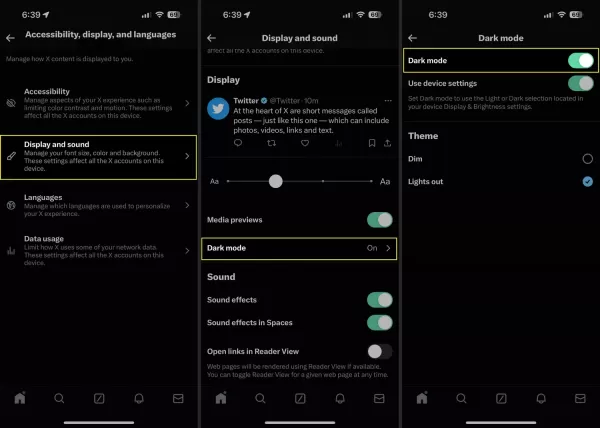
1.Launch the app on your Android or iOS device and perform a right swipe gesture to make the menu options appear.
2.Choose "Settings and privacy". In case you can't find it directly, tap on the "Settings and Support" heading to expand the section.
3.Opt for "Accessibility, display, and languages".
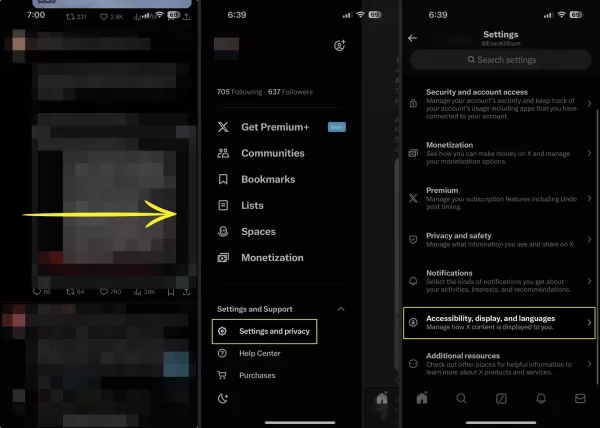
4.Select Dark Mode.
5.Here, several choices are available to you. You can toggle Dark Mode on or off, or configure it to activate automatically at sunset.
6.Furthermore, you can select your preferred theme, which is either Dim or Lights Out. Tap Dim to get a dark blue - themed display, and tap Lights Out to achieve a completely black appearance.
How to Turn on Night Mode in Windows 10 and the Web
The official X app for Windows 10 is built upon the web version of the social network. Owing to this similarity in coding, the method of enabling X's dark mode is identical for both the web platform and the Windows 10 app. Here's the procedure:
1.Open either the Windows 10 X app or Twitter.com in your favored web browser.
2.Click on More (the three - dot ellipses) > Settings and privacy > Display.
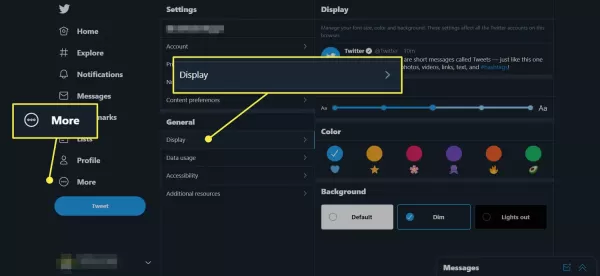
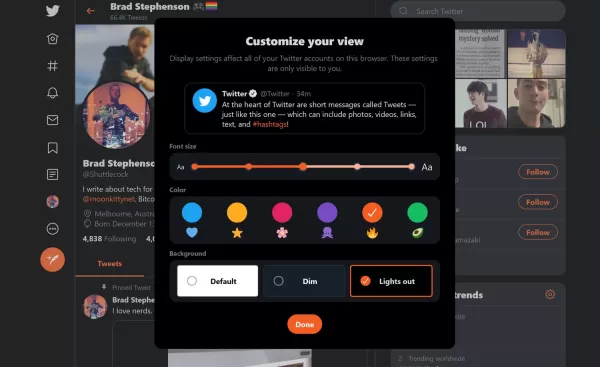
3.Choose either Dim to initiate the blue - themed dark mode or Lights Out to enable the standard black - colored dark mode.
4.You have the option to further personalize the dark mode by clicking on the colored icons positioned above the dark mode choices. This action modifies the color of the Twitter icons and hyperlinks.
What Is Night Mode?
X's dark mode, similar to YouTube's dark mode, is solely an aesthetic choice that alters the appearance of the social network, whether within an app or on the web.
Dark mode (alternatively known as Night Mode) is a well - liked feature. It has the potential to lessen the eye strain caused by looking at screens, particularly during the night. The option to switch to X's night mode is accessible in all official versions of the app as well as on the website. Moreover, numerous third - party apps also offer their own dark mode configurations. Here's how to utilize this feature.
Activating dark mode neither modifies the functionality of the site nor adds any additional features. Nevertheless, many users prefer to turn it on. This is because it is gentler on the eyes in low - light environments and can also conserve some battery power on newer smart devices equipped with an OLED screen.